

Set your language
In the app: click your profile at the bottom-left of the sidebar, then choose Language. The change takes effect immediately. On mira.day: use the language selector at the bottom of the homepage, or at the top of the sign-in page.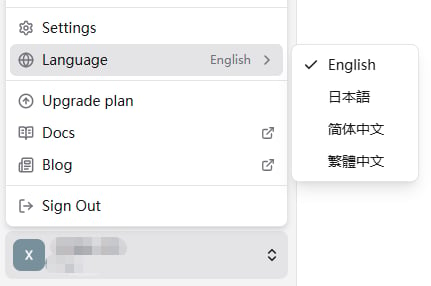
Supported languages
What gets translated, and what doesn’t
- Interface: all menus, buttons, navigation, and system messages appear in your selected language.
- Mira’s replies: Mira replies in the language you write in, including languages the interface doesn’t offer, and you can switch mid-conversation just by writing in another one.
- Candidate data: always shown in its original language, never machine-translated, so names, titles, and companies read exactly as they do at the source, without errors introduced by translation.
- Always in English: MiraDay, Mira, MRE, and a few other standard product and technical names.
What’s next
- Sign-in & Account: manage how you sign in and your account.
- Credits: what uses credits and where to see a channel’s usage.